











Computer Controls Available with the New InputStick
Check out the new device accessory that empowers NovaChat communicators with computer controls! Purchase your InputStick, a wireless USB receiver and use your AAC vocabulary as a keyboard. InputStick connects your NovaChat and your Windows®-based PC, Mac®, or Chromebook™ without cables. When using touch or scanning access methods, Chat Software now has the ability to type text, and with customized vocab buttons, perform specific functions or launch applications on a computer.
The InputStick accessory provides a great next step for independent computer work as well as communication across digital channels. Experience seamless typing when using your personalized AAC vocabulary file and features like word prediction. Enjoy the benefits of creating a document or sending a message in less time and with less frustration. The best part? Providing fun and engaging opportunities will encourage your communicator to keep using their AAC device. Everyone wins!
Getting started with computer controls
- InsertInputStick to your computer’s USB drive
- Use your existing vocabulary buttons to type
- Add computer controls commands to buttons within your vocabulary file to move between apps, move your cursor around, make selections, copy/paste, and more
Watch the video for details of this first phase of computer controls with NovaChat.
Vocabulary Updates for WordPower® Files
All WordPower Files
- Microsoft Word link corrected on the “Write to Apps” page
- On the social page, a button for “But I don’t I know what” is available following the selection of the “Something’s wrong!” button


WordPower 60 Baisc & WordPower 42 Basic
- A new logical next word has been added; following the selection of the “open” button, you will now see a button for “the door”


All Picture Communication Symbols (PCS) Files
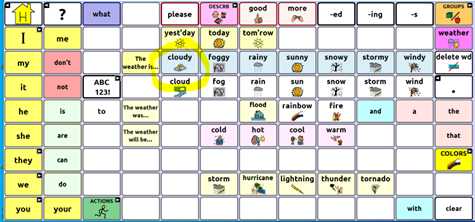
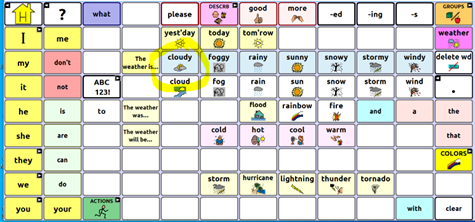
- You’ll notice symbol corrections throughout the files including the image for cloudy highlighted below

Looking to grow your communication partner skills? AAC Coaching Corner offers eLearning geared towards parents, families, and professionals to advance your AAC knowledge with the support of a coach and a group. Fall sessions are starting soon. Learn more.